A SaaS marketing strategy is a plan for how people find your product, try it, become paying customers and stay. It picks a small number of channels that reach your buyers where they look for solutions, matches each one to a stage of the buying journey, and measures what each customer costs to win against what they are worth over time. Below is a practical version: the stages, the channels, a 90-day plan and the four numbers to watch, with a worked example.
Want a team to run this with you? See our PPC for SaaS and SEO for SaaS services.
In short
- Start from one clear buyer and the problem they search for, not from a list of channels.
- Cover every stage: being found, being compared, the trial or demo, getting started, and staying.
- Pick two or three channels you can run well, measure them for 90 days, then add more.
- Watch customer acquisition cost (CAC), payback period, churn and customer lifetime value (LTV).
What makes SaaS marketing different #
Selling software by subscription changes what good marketing looks like in four ways:
- Revenue arrives monthly, not at the sale. A customer who leaves after two months may never pay back what it cost to win them, so keeping customers is part of marketing.
- People try before they buy. A free trial, free plan or demo sits between interest and payment, and the experience in the product does much of the selling.
- Buyers compare openly. Most SaaS categories have alternatives a search away, so comparison pages, reviews and honest pricing carry weight.
- B2B deals involve several people. The person who finds you is often not the one who pays, so you need material for users, managers and finance.
Start with the buyer, not the channel #
Write down, in one sentence each: who buys (job title and company type), the problem that makes them look for a tool, the words they would type into Google, and what they compare you with. Every channel decision comes from these four lines. A tool for finance teams at mid-size companies needs different channels from an app for freelancers, even if both are “SaaS”.
Define your ideal customer profile #
An ideal customer profile (ICP) describes the companies and people most likely to buy, succeed with the product and stay. Fill in this table with what you know from your best current customers, not with who you wish would buy.
| Question | Example answer |
|---|---|
| Company type and size | Accounting firms with 10 to 50 staff |
| Who uses it | Senior accountants and practice managers |
| Who pays | The managing partner |
| The trigger to look | Missed deadlines during tax season |
| What they search for | “practice management software for accountants” |
| What they compare you with | Spreadsheets and two named competitors |
| Main objection | Moving client data takes too long |
| Where they get advice | Peers, an industry association, LinkedIn |
If you have customers already, look at the ones who stayed longest and pay most. If you do not, talk to ten people in your target market before spending on ads.
Positioning: say what you are and who it is for #
Positioning is the short answer to “what is this and why should I care?”. A simple way to write it:
[Product] is a [category] for [ideal customer] that [main benefit], unlike [main alternative], which [main drawback].
Use the result on your homepage’s first screen, in your LinkedIn company page overview and in your ads. If a visitor cannot tell within a few seconds what the product does and who it is for, more traffic will not fix it.
The SaaS buying journey, stage by stage #
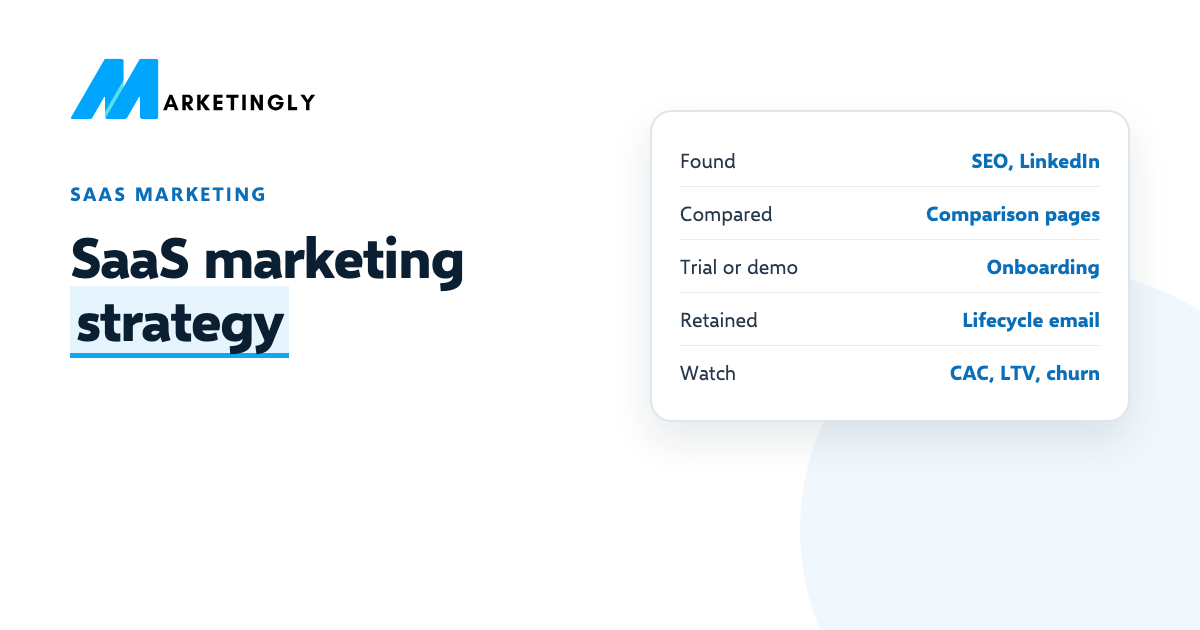
- Found. The buyer has a problem and searches for answers or asks peers. Content, SEO and LinkedIn do most of the work here.
- Compared. They make a shortlist. Comparison pages, alternatives pages, reviews and pricing pages matter most.
- Trial or demo. They sign up or book a call. The sign-up form, onboarding emails and a fast reply decide whether they go further.
- Activated. They reach the first moment where the product is clearly useful. Guides, in-app help and emails get them there.
- Retained and expanded. They keep paying and add seats or plans. Product updates, customer stories and good support keep churn down.
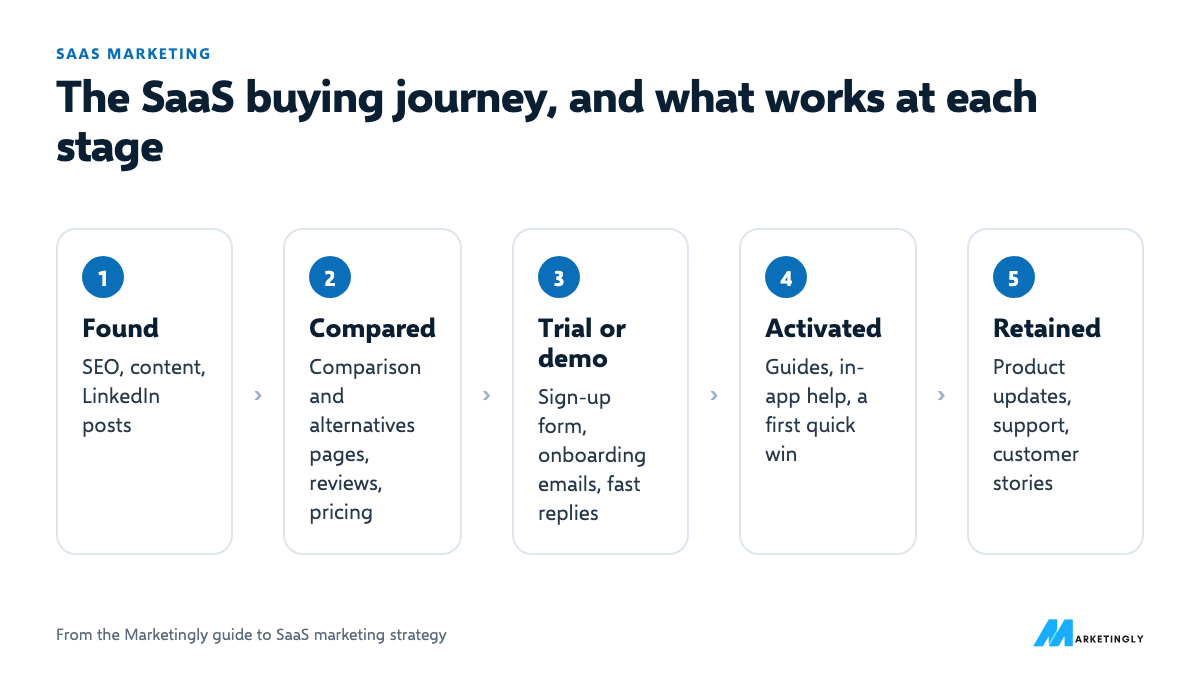
Most early-stage SaaS marketing only covers the first stage. The cheapest growth is often in stages three and four: more trials that turn into paying customers.
Give every person in the buying group what they need #
In B2B SaaS, the person who finds you rarely signs alone. Plan content for each role involved:
| Person | What they want to know | What to give them |
|---|---|---|
| The user | Will this make my work easier? | A trial, short how-to videos, a template to start from |
| Their manager | Will the team actually use it, and what changes? | Case studies from similar teams, a rollout plan |
| Finance | What does it cost, and what do we get back? | Clear pricing, a simple return-on-investment example |
| IT or security | Is our data safe, and does it fit our tools? | A security page, integration list, data export details |
Sales teams can send these pages directly, and they also rank for the searches each person makes.
Product-led, sales-led or both? #
| Product-led | Sales-led | |
|---|---|---|
| How people buy | Sign up, try, upgrade on their own | Book a demo, talk to sales, sign a contract |
| Fits when | The product is quick to understand and the price is low enough to buy without approval | The product needs setup, the price is high or several people must agree |
| Marketing focuses on | Sign-ups, activation and in-product upgrade prompts | Demo requests, target accounts and content for each decision-maker |
| Key number | Trial or free-to-paid rate | Demo-to-close rate and deal size |
Many SaaS companies end up with both: self-serve for small teams and a sales team for larger accounts. Decide which path each kind of customer takes, so your website does not send everyone to “book a demo”.
SaaS marketing channels compared #
| Channel | Reaches (speed) | What to measure |
|---|---|---|
| SEO and content | Buyers who search for the problem or for alternatives (slow: months) | Organic sign-ups, rankings for buying searches |
| Paid search (Google Ads) | Buyers already searching for a tool like yours (fast: days) | Cost per trial, cost per paying customer |
| LinkedIn (founder posts and ads) | B2B buyers by job title and company size (medium: weeks) | Profile visits, demo requests, cost per lead |
| Comparison and alternatives pages | Buyers making a shortlist (medium) | Sign-ups from those pages |
| Free trial or free plan | Buyers who want to try before talking to sales (ongoing) | Trial to paid rate |
| Email onboarding and lifecycle | People who already signed up (fast) | Activation rate, churn |
| Integrations and partners | Users of tools that connect with yours (slow) | Sign-ups from partner listings |
| Review sites | Buyers checking what users say (medium) | Review count and rating, referral sign-ups |
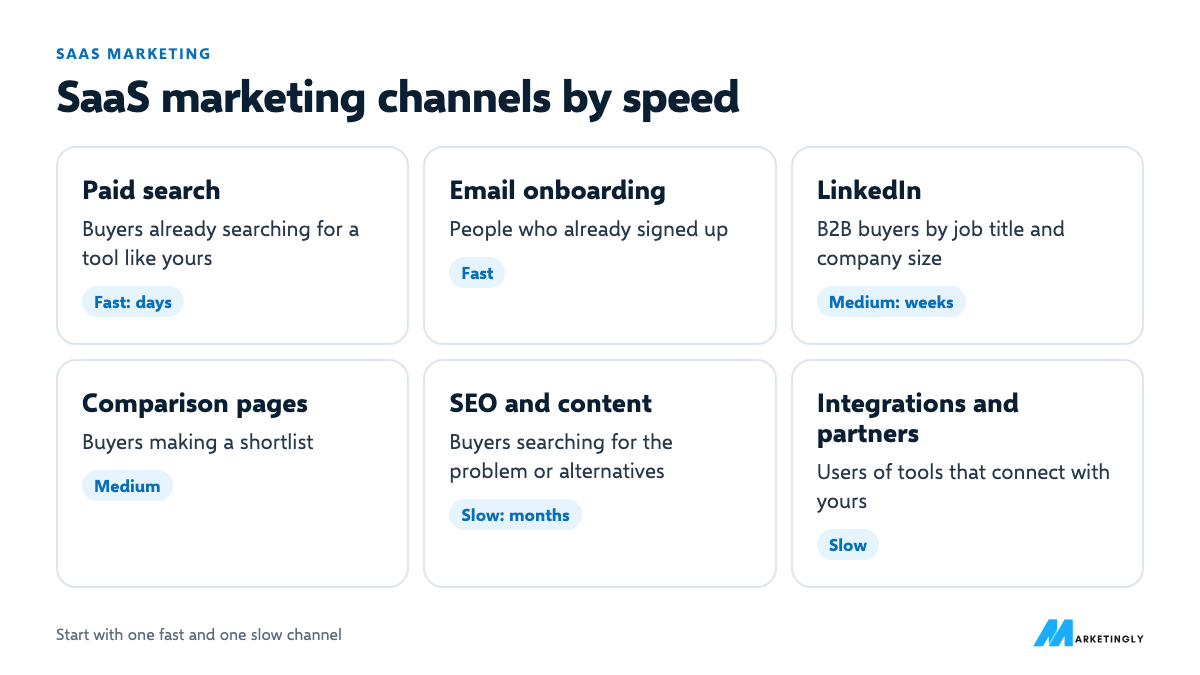
For the two slow but compounding channels, see our guides to a SaaS SEO strategy and SaaS content marketing.
How to choose your first two channels #
Answer these four questions, then pick one channel that can bring customers soon and one that builds over time:
- Do people already search for your category? If yes, paid search and SEO are strong options. If not, you need to create demand first, through LinkedIn, communities or partners.
- Can you reach buyers by job title? If you sell to a clear role in businesses, LinkedIn is likely to work.
- How much is a customer worth? Low-priced products need cheap, scalable channels such as SEO and self-serve trials. Higher-priced products can afford ads, events and sales.
- What can your team do well every week? A channel you cannot keep up will not work, however good it looks on paper.
Channel playbooks #
SEO and content #
Start with pages that match buying searches, then widen to the questions your buyers ask earlier on:
- Alternatives pages: “[Competitor] alternatives”.
- Comparison pages: “[You] vs [Competitor]”, written fairly.
- Use-case pages: “[Category] for [industry or team]”.
- Integration pages: one page for each tool you connect with.
- Templates and free tools your buyers would use anyway.
- Answers to the questions your sales team hears every week.
Our SaaS SEO strategy guide covers this step by step.
Paid search #
Split campaigns by intent so you can see what each costs: your brand name, competitor names, category searches (“[category] software”) and problem searches. Send each to the page that matches it, add negative keywords for job seekers and free-tool hunters, and judge campaigns on paying customers, not clicks.
LinkedIn #
For B2B SaaS, the founder’s profile is often the strongest channel at the start: weekly posts on one topic your buyers care about, and personal replies. LinkedIn Ads let you target by job title, industry and company size, which suits higher-priced products; offer something specific, such as a template or a short audit, rather than “book a demo” to strangers.
Email onboarding #
A simple trial sequence:
- Day 0: welcome, and the one action that gets them to value fastest.
- Day 1: how a customer like them uses the product.
- Day 3: a nudge if they have not done the key action yet.
- Day 7: answers to the common questions and an offer of help.
- Before the trial ends: what they will keep by upgrading, and a clear way to do it.
Review sites, communities and partners #
Ask happy customers for reviews on the sites your buyers check, take part in the communities they use (answer questions, do not spam links), and list your product in the marketplaces of tools you integrate with.
Build a pricing page that helps people decide #
- Say who each plan is for, not just what it includes (“For teams up to 10”).
- Show the price if you can. Hidden pricing sends many buyers to competitors who show theirs.
- Compare plans in one table, with the differences that matter, not every feature.
- Answer the common objections on the page: contracts, cancelling, data export, setup help.
- Make the next step obvious: start a trial, or talk to sales for larger plans.
Onboarding and activation #
Activation is the moment a new user first gets real value, such as sending their first invoice or running their first report. Pick the one action that best predicts that someone will become a paying customer, then remove every step between sign-up and that action: fewer form fields, a sample project, a short checklist and help at the right moment.
Track the activation rate: the share of new sign-ups who complete that action within a set number of days. It often moves revenue more than extra traffic does.
Retention and expansion #
- Watch usage, not just payments. Customers who stop logging in tend to cancel later. Reach out when usage drops.
- Talk to customers who leave. One short question about why gives you the most useful product and marketing feedback.
- Make upgrading natural. Prompt an upgrade when a customer hits a limit that a bigger plan removes.
- Share what is new. A monthly product update reminds customers why they pay.
Collect proof as you go #
- Case studies: after a customer gets a clear result, ask for a short call. Write it up as problem, what they did, the result with real numbers, and a quote they approve.
- Reviews: ask happy customers to review you on the sites your buyers check, at a moment they have just succeeded with the product.
- Logos and quotes: only with written permission. One named, specific quote beats ten vague ones.
- Your own numbers: releases shipped, customers served, support response times. Real figures you can stand behind build trust.
A 90-day SaaS marketing plan #
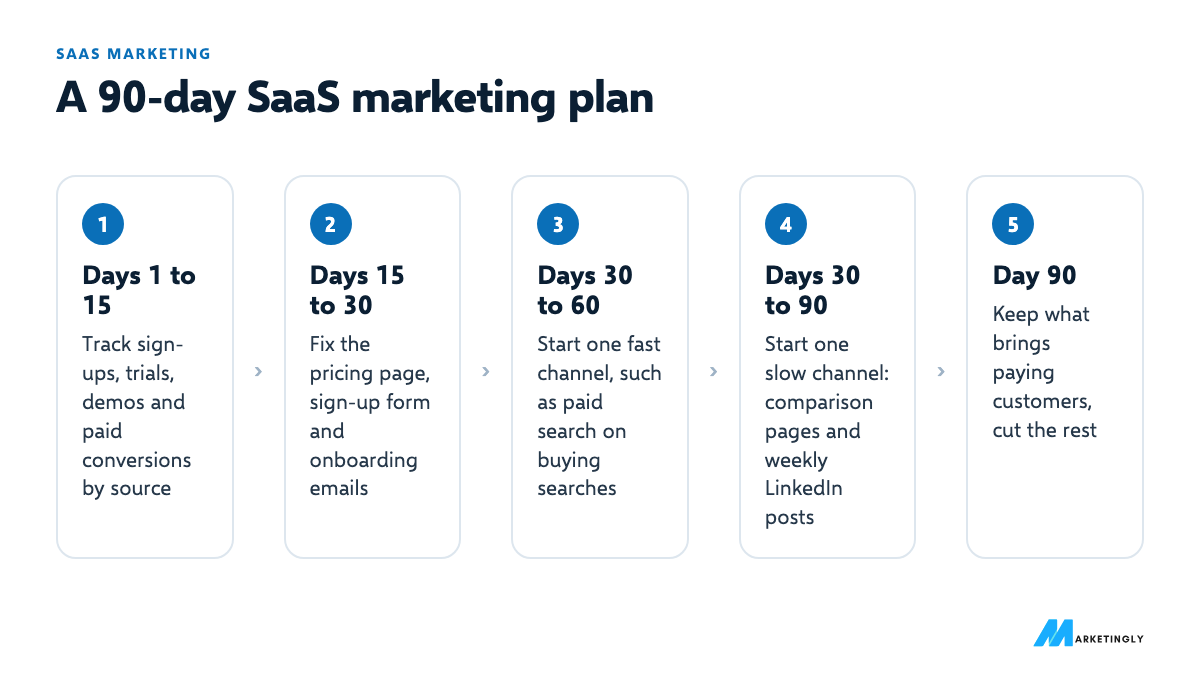
- Days 1 to 15: measure. Set up tracking for sign-ups, trials, demos and paid conversions, with the source of each. Without this, nothing below can be judged.
- Days 15 to 30: fix the end of the funnel. Tighten the pricing page, the sign-up form and the first onboarding emails. More paying customers from the same traffic is the cheapest win.
- Days 30 to 60: one fast channel. Usually paid search on buying searches such as “[category] software” or “[competitor] alternative”, with a small, tracked budget.
- Days 30 to 90: one slow channel. Publish comparison pages and answers to the questions your buyers search, and post on LinkedIn from the founder’s profile every week.
- Day 90: review. Keep what brings paying customers at a cost you can afford, cut the rest, then add the next channel.
The four numbers to watch #
- Customer acquisition cost (CAC): sales and marketing spend divided by new paying customers in the same period.
- Payback period: CAC divided by monthly revenue per customer multiplied by gross margin. How many months until a customer has paid back what it cost to win them.
- Churn: the share of customers (or revenue) you lose each month.
- Customer lifetime value (LTV): monthly revenue per customer multiplied by gross margin, divided by monthly churn.
A worked example #
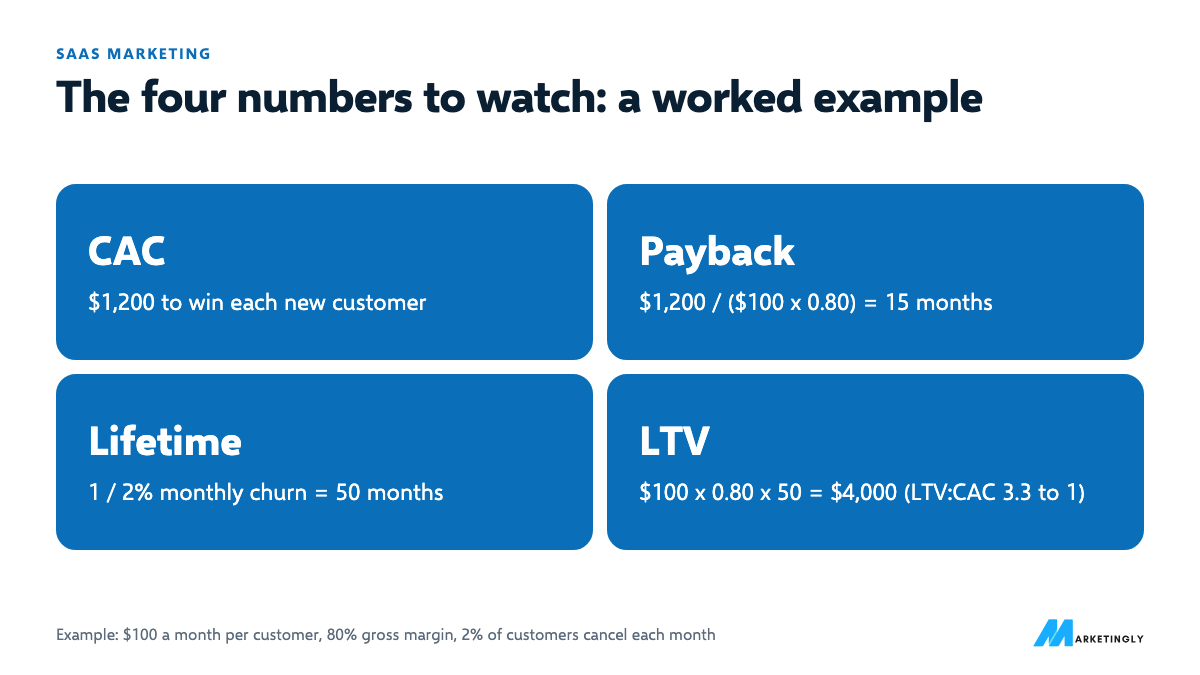
Say you spend $1,200 to win each new customer, each pays $100 a month, your gross margin is 80% and 2% of customers cancel each month.
- Payback: $1,200 / ($100 x 0.80) = 15 months.
- Average customer lifetime: 1 / 0.02 = 50 months.
- LTV: $100 x 0.80 x 50 = $4,000.
- LTV to CAC: $4,000 / $1,200 = 3.3 to 1.
A ratio often quoted as healthy is about 3 to 1, but what matters most is that payback fits your cash. Fifteen months is a long time to wait for money back if you are paying for ads every month. For paid campaigns, our free ROAS calculator shows the return you need to break even.
More numbers worth tracking #
- Trial-to-paid rate: paid conversions divided by trials started in the same period.
- Monthly recurring revenue (MRR): the total of all monthly subscription revenue.
- Net revenue retention (NRR): revenue this month from customers you had a year (or month) ago, including upgrades and minus downgrades and cancellations, divided by their revenue at the start.
Example: you start the year with $50,000 of MRR from existing customers. During the year they add $4,000 through upgrades, lose $1,000 through downgrades and $2,500 through cancellations. NRR = ($50,000 + $4,000 – $1,000 – $2,500) / $50,000 = 101%: existing customers alone grew revenue slightly, before any new ones. And if 60 of 400 trials become paying customers, the trial-to-paid rate is 15%.
Early signs vs final results #
Slow channels need early signs so you know they are working before revenue shows up. Track both columns:
| Channel | Early signs (weeks) | Final results (months) |
|---|---|---|
| SEO and content | Pages indexed, rankings rising, impressions in Search Console | Organic sign-ups and paying customers |
| LinkedIn posts | Profile views, comments from buyers, new followers in your target roles | Inbound messages, demo requests |
| Paid search | Click-through rate, cost per sign-up | Cost per paying customer, payback |
| Onboarding emails | Open and click rates on each email | Activation rate, trial-to-paid rate |
If the early signs are flat after a fair test, change the approach before the final results tell you the same thing months later.
Budget and team by stage #
| Stage | Focus | Who does the marketing |
|---|---|---|
| Finding product-market fit | Talking to customers, founder-led LinkedIn and outreach, a clear website | The founders |
| Early growth | One fast and one slow channel, tracking, onboarding emails | One marketer, or a founder with an agency or freelancers |
| Scaling | More channels, content at volume, lifecycle marketing, partnerships | A small team with specialists for paid, content and lifecycle |
At every stage, set the budget from what a customer is worth and how quickly they pay back, as in the worked example above, rather than from a percentage someone else uses.
Your ongoing marketing routine #
| How often | What to do |
|---|---|
| Every week | Check sign-ups, trials and paid conversions by source. Publish and post. Reply to every lead and comment. |
| Every month | Review cost per paying customer by channel. Update or improve one key page. Look at why customers cancelled. |
| Every quarter | Recalculate CAC, payback and LTV. Decide which channel gets more budget and which gets cut. Revisit your positioning against competitors. |
A real example: how we market SEOSage #
SEOSage, our own desktop SEO app, follows the same plan. People can try it free for 14 days with no card. It is available where its buyers already look for software: its website, the Microsoft Store and Homebrew for Mac users. Every release is listed in a public changelog, which shows active development to anyone comparing tools. Read the full SEOSage case study.
SaaS marketing checklist #
Use this as a quick audit of where you stand today:
- Our ideal customer profile is written down and based on real customers.
- The homepage says what the product is and who it is for in the first screen.
- Pricing is public, or there is a clear reason it is not.
- Sign-ups, trials, demos and paid conversions are tracked with their source.
- We know our activation action and measure the activation rate.
- New trials get an onboarding email sequence.
- We have pages for our main buying searches: category, alternatives, comparisons, use cases.
- The founder or team posts on LinkedIn every week, if we sell to businesses.
- Paid campaigns are judged on paying customers, not clicks or sign-ups.
- We have at least one case study with real numbers.
- We ask happy customers for reviews.
- We contact customers whose usage drops.
- We ask every cancelling customer why they leave.
- We know our CAC, payback period, churn and LTV, and review them every quarter.
Every box you cannot tick is a place to start. Fix the ones closest to revenue first: tracking, pricing page, onboarding.
Common SaaS marketing mistakes #
- Too many channels at once. Five half-run channels teach you nothing. Two run properly will.
- Measuring sign-ups, not paying customers. A channel with cheap trials that never convert is expensive.
- Writing for everyone. Content that answers your exact buyer’s questions beats general “productivity tips”.
- Ignoring churn. If customers leave as fast as they arrive, more marketing only makes the leak bigger.
Three more mistakes we see often #
- Copying a big company’s playbook. A company with a large brand and budget can afford channels that take years to pay off. An early-stage company usually cannot.
- Sending every visitor to “book a demo”. Many buyers want to try or see pricing first. Give self-serve buyers a self-serve path.
- Stopping a channel too early. SEO and LinkedIn take months. Judge them on leading signs, such as rankings and profile visits, before the sign-ups arrive.
Questions about SaaS marketing #
What is the best marketing channel for SaaS? #
There is no single best one. Paid search is fastest when people already search for your category; SEO and content compound over time; LinkedIn works well when you sell to businesses by job title. Most SaaS companies do best with one fast and one slow channel to start.
How much should a SaaS company spend on marketing? #
Work backwards from what a customer is worth. If your LTV is $4,000 and you want a 3 to 1 ratio, you can spend up to about $1,333 to win a customer. Then check that the payback period fits your cash.
Is a free trial or a free plan better? #
A trial creates urgency and suits products whose value shows quickly. A free plan suits products that spread inside teams or where users need time to build a habit. Test the one that fits how your customers decide.
How long does SaaS marketing take to work? #
Paid search can bring trials within days of launch. SEO and content usually take several months to bring steady sign-ups, which is why it pays to start them early.
How do you market a SaaS product with no budget? #
Talk to potential customers directly, post on LinkedIn from the founder’s profile, answer questions in communities your buyers use, and write the pages for the searches closest to buying. All of these cost time rather than money.
What is the difference between B2B and B2C SaaS marketing? #
B2B SaaS usually sells to several people at a company, with longer decisions, higher prices and more need for proof and sales conversations. B2C SaaS sells to individuals, often self-serve, so pricing, onboarding and app store or search visibility matter more.
How long should a SaaS free trial be? #
Long enough for a typical customer to reach the moment the product is clearly useful, and no longer. A simple tool may need a week; a product that needs setup or team adoption may need longer. Measure how long active customers take to get value, then set the trial around that.
How do you reduce churn in SaaS? #
Help new customers reach value quickly, watch for drops in usage and reach out early, ask cancelling customers why they leave, and fix the most common reasons. Annual plans can also reduce churn, because customers commit for longer.
Is SEO worth it for a SaaS company? #
Usually, yes, if people search for your category or the problems you solve. Pages for buying searches, such as alternatives and comparisons, can bring sign-ups for years without paying for each click. It takes months to work, so start early and pair it with a faster channel.
What should a SaaS homepage include? #
A clear statement of what the product does and for whom, the main benefits, a look at the product itself, proof such as reviews or case studies, pricing or a link to it, and one obvious next step, such as starting a trial.
Selling to businesses on LinkedIn? Start with our 30 LinkedIn post ideas and connection request templates.